OpenWrtなどLinux系で使うと、内蔵ドライバCDがまず優先認識されてしまい、一度抜き挿ししないとWiFiインターフェイスが認識されないMT7612搭載USB WiFiアダプタを改造して、始めからWiFiインターフェイスとして使えるようにしました。
MT7612U搭載USB WiFiアダプタ
NanoPi R2S OpenWrtルータ(関連記事はこちら)のUSBポートへ、このMediatek MT7612U搭載USB WiFiアダプタを挿して、内蔵WiFiの無いR2SへWiFiインターフェイスを追加しているのですが、
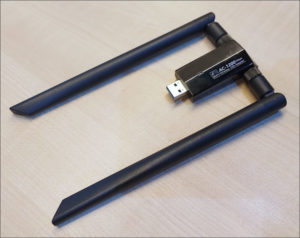
図1.MT7612U搭載USB WiFiアダプタ
以前の記事で指摘の通り、このWiFiドングルには内蔵ドライバCD機能があり、ドライバがインストールされていないWindowsマシンに挿すと、まずドライバの入ったストレージとして認識されるように作られています。

非Windows系システムにおける煩わしさ
OpenWrtなど非Windows系のシステムの場合、この振る舞いが弊害となり、そのままではWiFiドングルとして認識されないので、システム側のusb-modeswitch(OpenWrtではusb_modeswitch)により、正しく認識するようお膳立ての上、一度USBポートから抜き挿しさせる必要がありました。
この抜き挿し作業は通電したままのシステム再起動後は不要ですが、電源喪失などからのコールドスタートでは、その都度常に必要。
そこで、以前紹介したフォーラムで画像入りで述べられていた、ハードウェア改造法を試してみることに。

Ubuntu 18.04 上で振る舞い確認
ハードウェア改造前に、Ubuntu 18.04 Desktop上でその振る舞いを再確認してみます。
まずUSBポートに繋ぐと、MediaTekのデバイスが見つかりますが…
|
1 2 3 4 5 6 7 8 9 10 11 12 13 14 15 16 17 18 19 20 21 22 23 24 25 26 27 28 29 30 31 32 33 34 35 36 37 38 39 40 41 42 43 44 45 46 47 48 49 50 51 52 53 54 55 56 57 58 59 60 61 62 63 64 65 66 67 68 69 70 71 72 73 |
~$ lsusb Bus 002 Device 004: ID 0e8d:2870 MediaTek Inc. ~$ lsusb -v -D /dev/bus/usb/002/004 Bus 002 Device 004: ID 0e8d:2870 MediaTek Inc. Device Descriptor: bLength 18 bDescriptorType 1 bcdUSB 2.00 bDeviceClass 0 (Defined at Interface level) bDeviceSubClass 0 bDeviceProtocol 0 bMaxPacketSize0 64 idVendor 0x0e8d MediaTek Inc. idProduct 0x2870 bcdDevice 0.01 iManufacturer 1 iProduct 2 iSerial 3 bNumConfigurations 1 Configuration Descriptor: bLength 9 bDescriptorType 2 wTotalLength 32 bNumInterfaces 1 bConfigurationValue 1 iConfiguration 0 bmAttributes 0xa0 (Bus Powered) Remote Wakeup MaxPower 160mA Interface Descriptor: bLength 9 bDescriptorType 4 bInterfaceNumber 0 bAlternateSetting 0 bNumEndpoints 2 bInterfaceClass 8 Mass Storage bInterfaceSubClass 6 SCSI bInterfaceProtocol 80 Bulk-Only iInterface 0 Endpoint Descriptor: bLength 7 bDescriptorType 5 bEndpointAddress 0x82 EP 2 IN bmAttributes 2 Transfer Type Bulk Synch Type None Usage Type Data wMaxPacketSize 0x0200 1x 512 bytes bInterval 0 Endpoint Descriptor: bLength 7 bDescriptorType 5 bEndpointAddress 0x02 EP 2 OUT bmAttributes 2 Transfer Type Bulk Synch Type None Usage Type Data wMaxPacketSize 0x0200 1x 512 bytes bInterval 0 Device Qualifier (for other device speed): bLength 10 bDescriptorType 6 bcdUSB 2.00 bDeviceClass 0 (Defined at Interface level) bDeviceSubClass 0 bDeviceProtocol 0 bMaxPacketSize0 64 bNumConfigurations 1 Device Status: 0x0002 (Bus Powered) Remote Wakeup Enabled |
しかしそれは、読み取り専用のマスストレージデバイス。その中には、Windows向けドライバインストーラが収められています。
|
1 2 3 4 5 6 7 8 |
~$ lsblk sr0 11:0 1 1024M 0 rom sr1 11:1 1 127.5M 0 rom /media/user/wireless ~$ ls -l /media/user/wireless/ -r-------- 1 user user 32768 Mar 25 2014 AutoInst.exe -r-------- 1 user user 192 Dec 31 2013 Autorun.inf -r-------- 1 user user 12602786 Oct 25 2016 Setup.exe |
ここでUSB WiFiアダプタをUSBポートから抜き挿ししてみると、デバイスIDが変わり、WiFiデバイスとして認識されました。
|
1 2 3 4 5 6 7 8 9 10 11 12 13 14 15 16 17 18 19 20 21 22 23 24 25 26 27 28 29 30 31 32 33 34 35 36 37 38 39 40 41 42 43 44 45 46 47 48 49 50 51 52 53 54 55 56 57 58 59 60 61 62 63 64 65 66 67 68 69 70 71 72 73 74 75 76 77 78 79 80 81 82 83 84 85 86 87 88 89 90 91 92 93 94 95 96 97 98 99 100 101 102 103 104 105 106 107 108 109 110 111 112 113 114 115 116 117 118 119 120 121 122 123 124 125 126 127 128 129 130 131 132 133 134 135 136 137 138 139 140 141 142 143 144 145 146 147 148 |
~$ lsusb Bus 002 Device 007: ID 0e8d:7612 MediaTek Inc. ~$ lsusb -v -D /dev/bus/usb/002/007 Device: ID 0e8d:7612 MediaTek Inc. Device Descriptor: bLength 18 bDescriptorType 1 bcdUSB 2.10 bDeviceClass 0 (Defined at Interface level) bDeviceSubClass 0 bDeviceProtocol 0 bMaxPacketSize0 64 idVendor 0x0e8d MediaTek Inc. idProduct 0x7612 bcdDevice 1.00 iManufacturer 2 MediaTek Inc. iProduct 3 Wireless iSerial 4 000000000 bNumConfigurations 1 Configuration Descriptor: bLength 9 bDescriptorType 2 wTotalLength 74 bNumInterfaces 1 bConfigurationValue 1 iConfiguration 5 BT_Config bmAttributes 0xa0 (Bus Powered) Remote Wakeup MaxPower 100mA Interface Descriptor: bLength 9 bDescriptorType 4 bInterfaceNumber 0 bAlternateSetting 0 bNumEndpoints 8 bInterfaceClass 255 Vendor Specific Class bInterfaceSubClass 255 Vendor Specific Subclass bInterfaceProtocol 255 Vendor Specific Protocol iInterface 1 WiFi_If Endpoint Descriptor: bLength 7 bDescriptorType 5 bEndpointAddress 0x84 EP 4 IN bmAttributes 2 Transfer Type Bulk Synch Type None Usage Type Data wMaxPacketSize 0x0200 1x 512 bytes bInterval 0 Endpoint Descriptor: bLength 7 bDescriptorType 5 bEndpointAddress 0x85 EP 5 IN bmAttributes 2 Transfer Type Bulk Synch Type None Usage Type Data wMaxPacketSize 0x0200 1x 512 bytes bInterval 0 Endpoint Descriptor: bLength 7 bDescriptorType 5 bEndpointAddress 0x08 EP 8 OUT bmAttributes 2 Transfer Type Bulk Synch Type None Usage Type Data wMaxPacketSize 0x0200 1x 512 bytes bInterval 0 Endpoint Descriptor: bLength 7 bDescriptorType 5 bEndpointAddress 0x04 EP 4 OUT bmAttributes 2 Transfer Type Bulk Synch Type None Usage Type Data wMaxPacketSize 0x0200 1x 512 bytes bInterval 0 Endpoint Descriptor: bLength 7 bDescriptorType 5 bEndpointAddress 0x05 EP 5 OUT bmAttributes 2 Transfer Type Bulk Synch Type None Usage Type Data wMaxPacketSize 0x0200 1x 512 bytes bInterval 0 Endpoint Descriptor: bLength 7 bDescriptorType 5 bEndpointAddress 0x06 EP 6 OUT bmAttributes 2 Transfer Type Bulk Synch Type None Usage Type Data wMaxPacketSize 0x0200 1x 512 bytes bInterval 0 Endpoint Descriptor: bLength 7 bDescriptorType 5 bEndpointAddress 0x07 EP 7 OUT bmAttributes 2 Transfer Type Bulk Synch Type None Usage Type Data wMaxPacketSize 0x0200 1x 512 bytes bInterval 0 Endpoint Descriptor: bLength 7 bDescriptorType 5 bEndpointAddress 0x09 EP 9 OUT bmAttributes 2 Transfer Type Bulk Synch Type None Usage Type Data wMaxPacketSize 0x0200 1x 512 bytes bInterval 0 Binary Object Store Descriptor: bLength 5 bDescriptorType 15 wTotalLength 22 bNumDeviceCaps 2 USB 2.0 Extension Device Capability: bLength 7 bDescriptorType 16 bDevCapabilityType 2 bmAttributes 0x0000f41e Link Power Management (LPM) Supported SuperSpeed USB Device Capability: bLength 10 bDescriptorType 16 bDevCapabilityType 3 bmAttributes 0x00 wSpeedsSupported 0x000e Device can operate at Full Speed (12Mbps) Device can operate at High Speed (480Mbps) Device can operate at SuperSpeed (5Gbps) bFunctionalitySupport 1 Lowest fully-functional device speed is Full Speed (12Mbps) bU1DevExitLat 10 micro seconds bU2DevExitLat 180 micro seconds Device Status: 0x0002 (Bus Powered) Remote Wakeup Enabled |
この振る舞いはOpenWrtと同じです。
MT7612U USB WiFiアダプタの改造手順
USB WiFiアダプタの筐体は表裏で嵌っているだけなので、側面の境い目に爪を入れて容易に分解することができます。基板上まず目に入るのは、128Mb(16MB)SPIフラッシュメモリMX25L12835Fで、この中にドライババイナリが保存されています。

図2.USB WiFiアダプタ筐体を開く
取り出した基板の表側はこのようになっています。上述のフォーラムのコメントに添付されていた基板画像と全く同じではありませんが、中心部分は同じようなレイアウトに見えます。

図3.MT7612 USB WiFiアダプタ基板表
真ん中のMT7612U部分を拡大、その下の赤枠で囲った3つの表面実装抵抗を取り除きます。

図4.取り除くべき表面実装抵抗
肉眼ではそこに抵抗があるのかすらよく見えない程の小ささなので、できればマイクロスコープ越しに作業するのが理想ですが、ルーペ眼鏡で基板に寄ってハンダこてを当てて、なんとか対象の抵抗だけを除去できました。

図5.表面実装抵抗の除去成功
改造後の振る舞い確認
元通り組み直し、NanoPi R2SのUSBポートに挿してコールドスタート。
|
1 2 3 4 5 6 7 8 9 10 11 12 13 14 15 16 17 18 19 20 21 22 23 24 25 26 27 28 29 30 31 32 33 34 35 36 37 38 39 40 41 42 43 44 45 46 47 48 49 50 51 52 53 54 55 56 57 58 59 60 61 62 63 64 65 66 67 68 69 70 71 72 73 74 75 76 77 78 79 80 81 82 83 84 85 86 87 88 89 90 91 92 93 94 95 96 97 98 99 100 101 102 103 104 105 106 107 108 109 110 111 112 113 114 115 116 117 118 119 120 121 122 123 124 125 126 127 128 129 130 131 132 133 134 135 136 137 138 139 140 141 142 143 144 145 146 147 148 149 150 151 |
root@R2S:~# lsusb Bus 001 Device 002: ID 0e8d:7612 MediaTek Inc. Wireless root@R2S:~# lsusb -v -D /dev/bus/usb/001/002 Device: ID 0e8d:7612 MediaTek Inc. Wireless Device Descriptor: bLength 18 bDescriptorType 1 bcdUSB 2.10 bDeviceClass 0 bDeviceSubClass 0 bDeviceProtocol 0 bMaxPacketSize0 64 idVendor 0x0e8d idProduct 0x7612 bcdDevice 1.00 iManufacturer 2 MediaTek Inc. iProduct 3 Wireless iSerial 4 000000000 bNumConfigurations 1 Configuration Descriptor: bLength 9 bDescriptorType 2 wTotalLength 0x004a bNumInterfaces 1 bConfigurationValue 1 iConfiguration 5 BT_Config bmAttributes 0xa0 (Bus Powered) Remote Wakeup MaxPower 100mA Interface Descriptor: bLength 9 bDescriptorType 4 bInterfaceNumber 0 bAlternateSetting 0 bNumEndpoints 8 bInterfaceClass 255 bInterfaceSubClass 255 bInterfaceProtocol 255 iInterface 1 WiFi_If Endpoint Descriptor: bLength 7 bDescriptorType 5 bEndpointAddress 0x84 EP 4 IN bmAttributes 2 Transfer Type Bulk Synch Type None Usage Type Data wMaxPacketSize 0x0200 1x 512 bytes bInterval 0 Endpoint Descriptor: bLength 7 bDescriptorType 5 bEndpointAddress 0x85 EP 5 IN bmAttributes 2 Transfer Type Bulk Synch Type None Usage Type Data wMaxPacketSize 0x0200 1x 512 bytes bInterval 0 Endpoint Descriptor: bLength 7 bDescriptorType 5 bEndpointAddress 0x08 EP 8 OUT bmAttributes 2 Transfer Type Bulk Synch Type None Usage Type Data wMaxPacketSize 0x0200 1x 512 bytes bInterval 0 Endpoint Descriptor: bLength 7 bDescriptorType 5 bEndpointAddress 0x04 EP 4 OUT bmAttributes 2 Transfer Type Bulk Synch Type None Usage Type Data wMaxPacketSize 0x0200 1x 512 bytes bInterval 0 Endpoint Descriptor: bLength 7 bDescriptorType 5 bEndpointAddress 0x05 EP 5 OUT bmAttributes 2 Transfer Type Bulk Synch Type None Usage Type Data wMaxPacketSize 0x0200 1x 512 bytes bInterval 0 Endpoint Descriptor: bLength 7 bDescriptorType 5 bEndpointAddress 0x06 EP 6 OUT bmAttributes 2 Transfer Type Bulk Synch Type None Usage Type Data wMaxPacketSize 0x0200 1x 512 bytes bInterval 0 Endpoint Descriptor: bLength 7 bDescriptorType 5 bEndpointAddress 0x07 EP 7 OUT bmAttributes 2 Transfer Type Bulk Synch Type None Usage Type Data wMaxPacketSize 0x0200 1x 512 bytes bInterval 0 Endpoint Descriptor: bLength 7 bDescriptorType 5 bEndpointAddress 0x09 EP 9 OUT bmAttributes 2 Transfer Type Bulk Synch Type None Usage Type Data wMaxPacketSize 0x0200 1x 512 bytes bInterval 0 Binary Object Store Descriptor: bLength 5 bDescriptorType 15 wTotalLength 0x0016 bNumDeviceCaps 2 USB 2.0 Extension Device Capability: bLength 7 bDescriptorType 16 bDevCapabilityType 2 bmAttributes 0x0000f41e BESL Link Power Management (LPM) Supported BESL value 1024 us Deep BESL value 61440 us SuperSpeed USB Device Capability: bLength 10 bDescriptorType 16 bDevCapabilityType 3 bmAttributes 0x00 wSpeedsSupported 0x000e Device can operate at Full Speed (12Mbps) Device can operate at High Speed (480Mbps) Device can operate at SuperSpeed (5Gbps) bFunctionalitySupport 1 Lowest fully-functional device speed is Full Speed (12Mbps) bU1DevExitLat 10 micro seconds bU2DevExitLat 180 micro seconds can't get debug descriptor: Resource temporarily unavailable Device Status: 0x0002 (Bus Powered) Remote Wakeup Enabled |
WiFiアダプタを抜き挿しせずとも一発でWiFiデバイスとして認識、機能するようになりました。

